
How to set the time and date on a watch without breaking anything: the crown, the date, digital watches

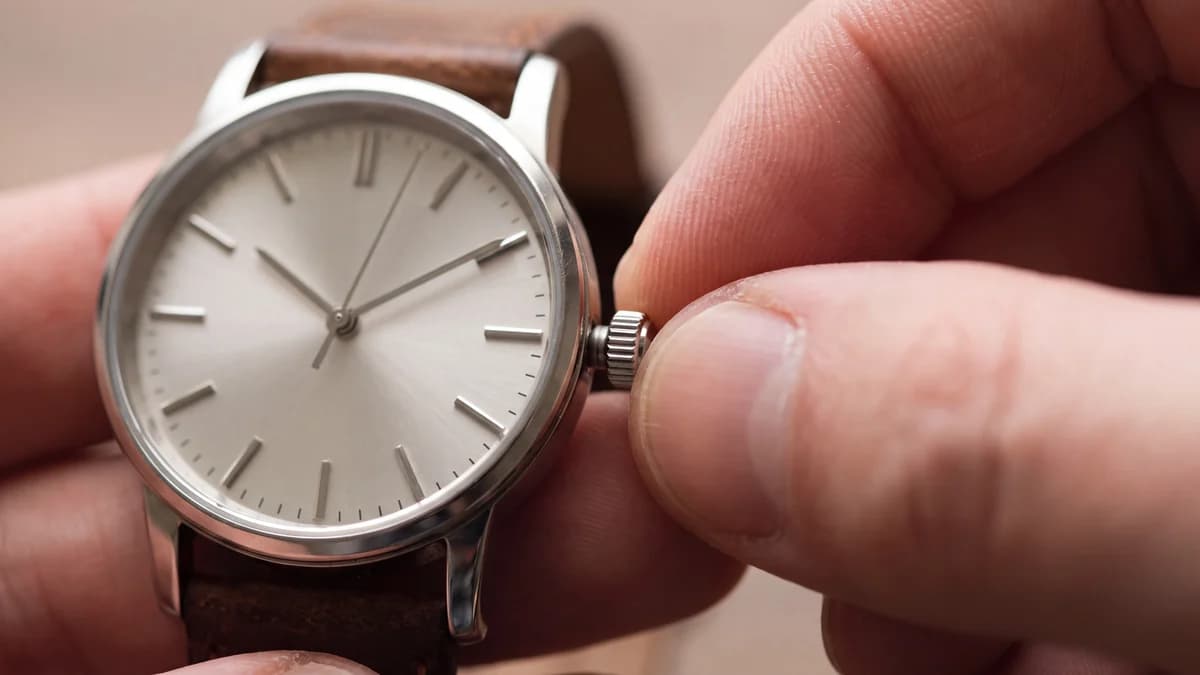
Setting a watch looks like the simplest thing in the world: pull the crown, turn, push it back. Yet this is exactly when most of the small breakages watchmakers see actually happen: a tooth torn off the date wheel in the middle of the night, a screw-down crown left loose that lets water in, a date that has been changing at noon for months without anyone understanding why. This guide explains how to set a watch with hands, how to set the date on a watch without breaking anything, how to handle a screw-down crown, and how to set a digital watch with four buttons.

The watch crown: three positions, three functions
The watch crown, the small fluted knob on the side of the case, is more than a dial to spin. It pulls out in clicks, and each click engages a different mechanism. On the vast majority of watches with hands and a date, there are three positions. Position 0, crown pushed in: this is the wearing position; on an automatic watch that allows it, turning the crown here winds the mainspring by hand. Position 1, first click: the quick-set date; depending on the watch, one direction of rotation moves the date and the other moves the day of the week. Position 2, second click: setting the time; the hands turn with the crown.
On a watch without a date there is only one pulled-out position, used to set the time. If your crown will not pull out at all, do not force it: it is probably a screw-down crown, which we come back to below. And if a click feels "soft", or the crown pops out on its own, that is the sign of a tired winding stem, which a watchmaker replaces in a few minutes; carrying on handling it like that ends with it breaking inside the case.
| Crown position | Three-hand watch with date | Watch without a date | Automatic watch |
|---|---|---|---|
| 0: pushed in (or screwed down) | Wearing position | Wearing position | Hand-winding, if the calibre allows it |
| 1: first click | Quick-set date (and day) | Time setting | Quick-set date |
| 2: second click | Time setting | (does not exist) | Time setting, seconds hand often stopped |
A watchmaker's trick: always finish clockwise
The gears that drive the hands have a little play in them. If you set the time by winding backwards, the minute hand can shift by a fraction of a minute as soon as the movement starts again. Always go slightly past the time you want, then come back forwards: the play is taken up and the hand lands exactly on the marker. For accuracy to the second, on most quartz watches and many automatics the seconds hand stops while the crown is pulled out to the time position: pull it out when the hand reaches 12, set the minutes, and push the crown back in on the beep of a reference clock.
Setting the date: the 9 pm to 3 am danger zone
This is the single most important rule in this guide. The date does not change instantly: on a mechanical watch, and on many quartz watches with a date, a wheel starts pushing the date disc several hours before midnight and only lets go several hours after. During that period, roughly from 9 pm to 3 am depending on the calibre (the manual gives the exact window), the date mechanism is engaged. If you force the quick-set at that moment, the two mechanisms meet, and a tooth gives way. The watch often keeps telling the time, but the date no longer changes, or changes crookedly.
This affects a lot of watches: in our stock, seven watches out of ten have a date window (1,652 of the 2,331 whose listing specifies this function), and the overwhelming majority of them are quartz. So the habit is not just for automatics, whose inner workings we explain in the film How an automatic watch works.
Where are the hands before you correct the date?
The day-before method, safe on every watch
This method works on any watch with hands and a date, even when you have no idea where the mechanism is. It has a second advantage: it also sorts out morning versus evening.
- Set the hands to 6:30 (crown at the second click). At that time, the date mechanism is always free.
- Set the date to yesterday's (crown at the first click): if today is the 15th, show the 14th.
- Go back to the second click and move the hands forward, always forwards, until the date changes to the 15th. You are now just past midnight.
- Keep going forward to the current time, adding twelve hours if it is the afternoon, then push the crown back in (or screw it down).
Why the date changes at noon
It is one of the questions we hear most often: "my watch changes date at noon". The watch is not faulty. It has simply been set twelve hours out: it thinks it is midnight when it is midday. The fix is simple: crown at the second click, move the hands one full turn of the dial (twelve hours), and the date will change at night again. The day-before method avoids this trap from the start.
Day and date: the bilingual disc
On watches that also show the day of the week, the first click often moves the date in one direction and the day in the other. Many calibres carry a day disc in two languages, for example English and Spanish or French: as you move the day, you will see each day go past twice. Pick your language once and for all; the disc will then always stay in it. If your watch shows a day in an unexpected language, it is not a fault, just the second set of days.
The screw-down crown: unscrew, set, screw fully home
On dive watches and many sports watches, the screw-down crown is part of the water resistance: it presses a gasket against a threaded tube. To set the watch, you therefore have to free it first. Turn it towards you (anticlockwise) until it "jumps" slightly outwards under its spring: it is now in position 0, and you can pull it out to the usual clicks.
Closing it again is the only genuinely delicate step. Push the crown against the case, then turn clockwise while keeping that pressure: you will feel the thread catch. Screw it down until it seats, finger-tight, without forcing it like a nut. A crown that "spins freely" without catching, or that screws in at an angle, must never be forced: it is the thread on the tube that gets damaged, and the repair means taking the case apart.
A screw-down crown that has not been screwed fully home is not water resistant at all, whatever rating is engraved on the back. Our film water resistance is a pressure, not a depth shows it: a crown pulled out or unscrewed by a quarter turn, and water resistance drops to zero. And since the warranty never covers water resistance problems, this step is entirely yours. Our guide 5 ATM: shower, pool, swimming details what each rating really allows.

The right moves
- Pull the crown out one click at a time, feeling each position.
- Correct the date only when the hands are between roughly 3 am and 9 pm.
- Finish setting the time going forwards, to take up the play in the gears.
- Unscrew a screw-down crown before pulling it, screw it fully home before water.
- Check the crown with a fingertip before every shower or swim.
Avoid at all costs
- Correcting the date in the middle of the night, or without knowing whether the watch shows morning or evening.
- Forcing out a crown that will not come: it is probably screwed down.
- Screwing a crown in at an angle, or with pliers.
- Touching the crown or pushers under water.
- Wearing the watch with the crown pulled out.
When the clocks change: when and how
Twice a year, on the last Sunday of March and the last Sunday of October, you have to move your watch forward or back by one hour. The trap is doing it during the night, at the moment the clocks change: the hands are then right in the 9 pm to 3 am window. Do it in the morning. In autumn, going back one hour at 10 am is safe, even on a watch with a date. If you would rather never turn the hands of a mechanical watch backwards, move them forward eleven hours instead: the result is the same, but the date will change, so correct it afterwards with the day-before method.
The chronograph whose hands no longer return to zero
On a quartz chronograph, after a knock or a battery change, the chronograph seconds hand or a subdial hand sometimes no longer returns exactly to zero when you reset the chronograph. It is not a fault: the movement has simply lost its reference position. On many calibres, you reset the chronograph hands with the crown pulled out to the time position: one pusher then advances the hand step by step to zero, and a long press, sometimes on both pushers together, moves on to the next hand. The exact sequence depends on the calibre and is in its manual. Chronographs make up about one watch in eight in our stock (465 references), which makes this one of the most requested settings after the date. Our selection of men's chronograph watches brings these models together.
How to set a digital watch, with 3 or 4 buttons
Digital watches have no crown, but their logic is almost always the same whatever the brand: one button to enter setting mode, one to move between fields, one to change the value. What changes from model to model is which button does what. The safest approach is to read the module number engraved on the back (a three or four digit number): that number, not the model name, matches the manual.
| Type of digital watch | Enter setting mode | Change field | Change value |
|---|---|---|---|
| Three buttons, retro style (module 593: F-91W, A158W) | Press the mode button (bottom left) three times: the seconds flash | Light button (top left) | Bottom right button; on the seconds, it resets them to zero |
| Four buttons, sports watches and G-Shock | Hold the adjust button (top left) until the display flashes | Mode button (bottom left) | Right-hand buttons: one up, one down |
| Analogue-digital (two displays) | Crown for the hands; buttons for the screen | Mode button | Right-hand buttons, as on a digital watch |
On three-button models, a short press on the bottom right button in normal display often switches between 12-hour and 24-hour time. On four-button models that show a city code, summer time is set in that same menu: simply switch it on or off when the clocks change, without touching the minutes. If an old digital watch has a frozen or faint display, start with the battery: pale digits or missing segments signal a battery at the end of its life, as explained in our guide to changing a watch battery. And to choose a digital or retro model, our Casio watch guide compares the ranges.
Our figures also show why this guide starts with the crown: among the watches in stock whose listing specifies the display, 98 % have hands, while digital models (54 references) and analogue-digital ones (16) remain the exception.

A crown that won't screw back, a date that's stuck?
Our after-sales form directs your request in a few questions: crown, winding stem, date, or movement.
Setting a watch is mostly about doing things in the right order: crown freed, time set going forwards, date corrected outside the 9 pm to 3 am window, then the crown pushed back or screwed fully home. And if you are still torn between an automatic and a quartz watch for everyday wear, our automatic vs quartz guide sets out their differences.
Frequently asked questions
Why shouldn't you set the date between 9 pm and 3 am?
During that period, roughly, the mechanism that moves the date disc is already engaged. Forcing the quick-set at that moment can break a tooth on the date wheel. The exact window depends on the calibre and is given in its manual.
My watch changes date at noon, is it broken?
No. It has been set twelve hours out. Pull the crown to the time position and move the hands one full turn of the dial: the date will change at midnight again.
My crown won't pull out, what should I do?
It is almost certainly a screw-down crown. Turn it anticlockwise until it releases, then pull it out. Don't forget to screw it fully home, pushing it in while you turn, before any contact with water.
How do I set a digital watch with four buttons?
Hold the top left button until the display flashes, move between fields with the bottom left button, and change the value with the right-hand buttons. The module number engraved on the back lets you find the exact manual.
What if the date no longer changes at all?
First check that it isn't changing at noon. If it changes neither at noon nor at midnight, or sits between two numbers, a tooth in the date mechanism may be damaged: stop forcing the quick-set and take the watch to a watchmaker, or use our after-sales form for a watch bought from us.
Read next
More in this vein

Care & maintenance
Watch anatomy: the name of every part, and what it tells you about your watch
Care & maintenance
How to Clean a Watch and its Strap Without Damaging It: Steel, Leather, Silicone, Mesh, and the Moves to Avoid
Care & maintenance
How to Change a Watch Battery: a Watchmaker's Method, and the Step Almost Everyone Forgets
Care & maintenance
Crystals and rhinestones falling from a watch: why, and how to protect them
Care & maintenance
Casio Water Resist: is your vintage watch water resistant? (A158, A168, LA670)
Care & maintenance
Dust on a watch dial: how to remove it easily
Care & maintenance
Watch Water Resistance Ratings: ATM, Bar, Metres (Complete Guide)
Care & maintenance